If your IHD is made by In Home Displays
This advice applies to England. See advice for See advice for Northern Ireland, See advice for Scotland, See advice for Wales
Help us improve our website
Take 5 minutes to tell us if you found what you needed on our website. Your feedback will help us give millions of people the information they need.
You should be able to find the model and the user manual below.
SmartView 2
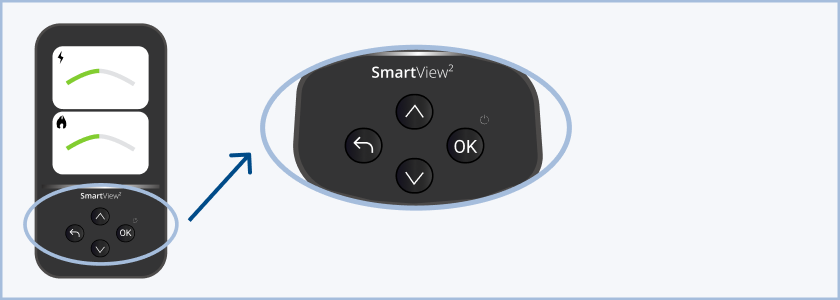
The SmartView 2 has:
4 raised buttons
'SmartView2' is printed below the display
Watch the SmartView 2 video user guide from E.ON.
SmartView or SmartView 3

The SmartView or SmartView 3 has:
4 raised buttons under the screen
'SmartView' or 'SmartView3' above the buttons
Some energy suppliers have produced their own versions of the user manual for the SmartView. You can:
view the online user guide for SmartView 3 on the In Home Displays website
download the SmartView user manual from the Scottish Power website
SmartView 4
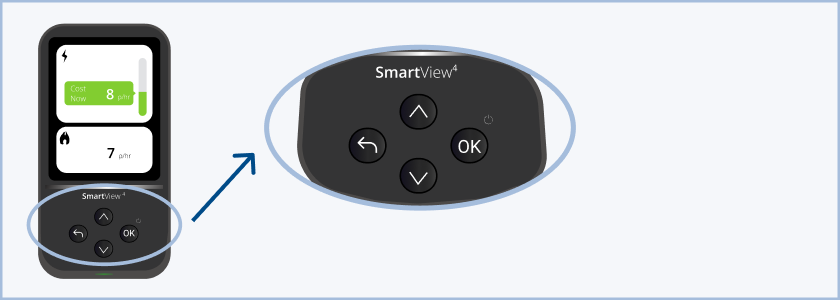
The SmartView 4 has:
4 raised buttons under the screen
'SmartView4' above the buttons
There is no user manual available for the SmartView4.
SmartView Pro

The SmartView Pro has:
3 touch buttons under the screen (Home, Menu and Back)
1 raised on/off button under the display
There is no user manual available for the SmartView Pro.
If you can’t find your in-home display
If your in-home display isn’t in this list, you can find your IHD by the number of buttons it has.
If you still can’t find your in-home display you should contact your energy supplier.
Help us improve our website
Take 5 minutes to tell us if you found what you needed on our website. Your feedback will help us give millions of people the information they need.
Page last reviewed on 21 January 2026